

Google Block Breaker are comes to free arcade game hiding inside Google Search. Type “block breaker” in Google and hit play, and you bounce a ball with a paddle to smash rows of blocks. No app. also No login. No cost. This article skips the fluff and best shows you the rules, symbols, power-ups and tricks that actually help you play better.
Google Block Breaker: The Real Player’s Guide
So, What Is This Game Exactly?
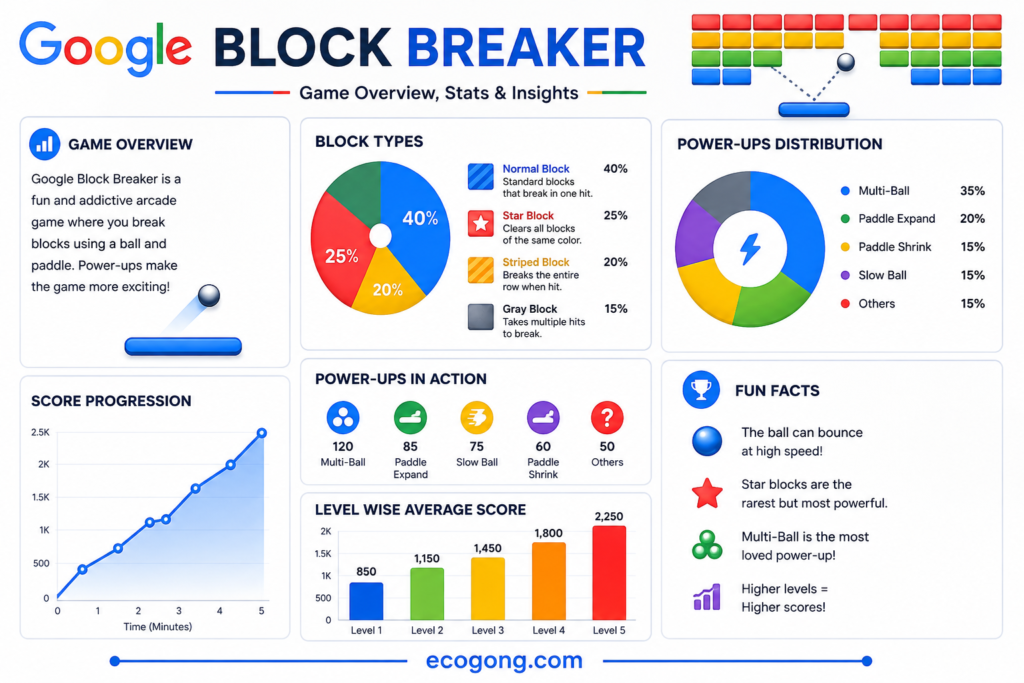
A many articles just tell you google block breaker “exists.” That is like say a restaurant “serves food.” True, but not helpful.
So just look at it closely and discuss the same. This game falls into the category of brick-breakers. You can be reminded of the very first game in this family named Breakout, launched in 1976.
The only different is that Breakout was created for other communication devices while this game is more intended for online usage.
Meaning, you have a paddle at the bottom of the display and it bounces the ball. Your task here is to hit all the blocks in the upper dimension of the screen.
The game lives right inside Google Search. You not find it in an app store. You not need an account.
check here what most write ups skip: this not just a cute novelty. Once you learn its rhythm, you actually want to beat your last score. I know I did.
How to Pull It Up (Step by Step)
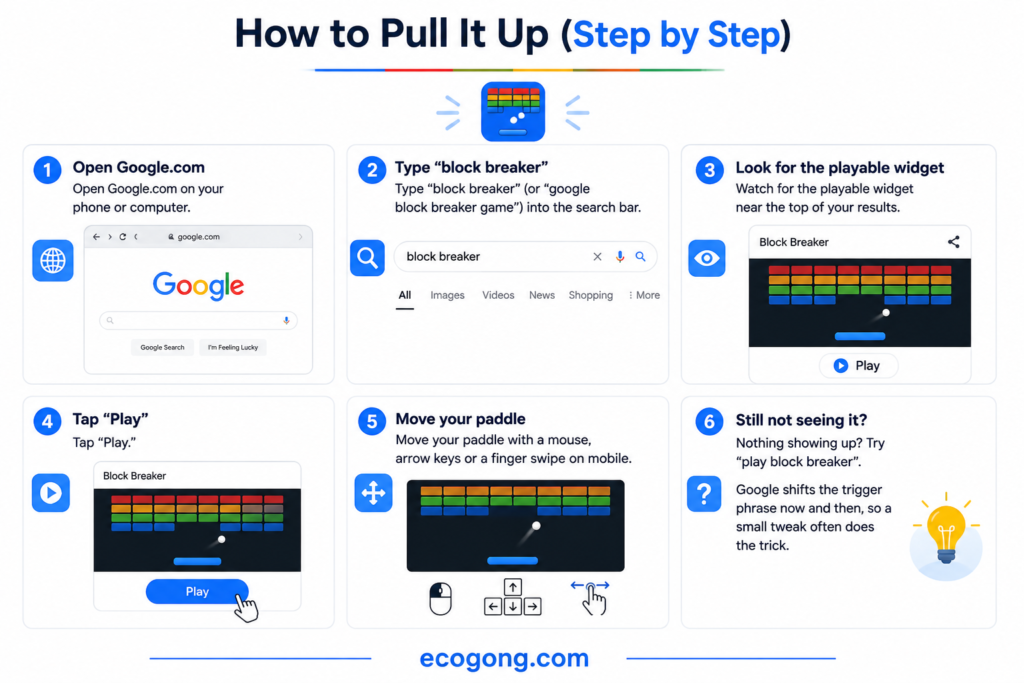
This part moves fast, but here get it exactly right so you are not hunting around for nothing.
- Open Google.com on your phone or computer.
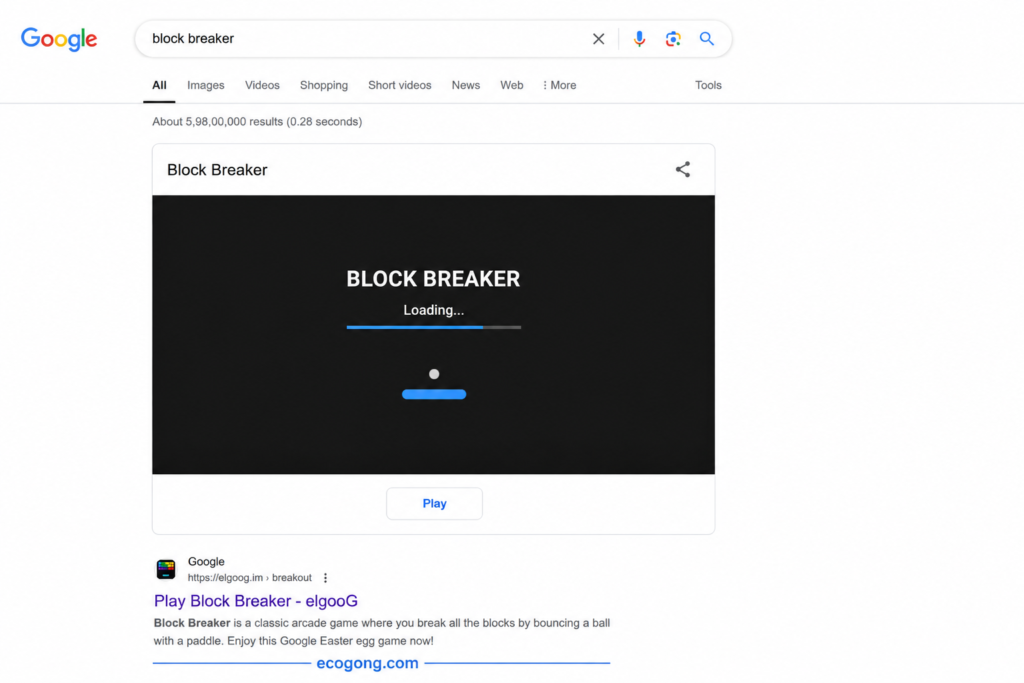
- Type “block breaker” (or “google block breaker game”) into the search bar.
- Watch for the playable widget near the top of your results.
- Tap “Play.”
- Move your paddle with a mouse, arrow keys or a finger swipe on mobile.
Nothing showing up? Try “play block breaker”. Google shifts the trigger phrase now and then, so a small tweak often does the trick.
On mobile: the swipe controls feel surprisingly smooth, even on an older phone. I tested it on a mid range Android and a few year old iPhone. Neither one lagged.
What to Do If Block Breaker Won’t Load
Many time widget just doesn’t show up, and it usually not you. A few quick fixes solve many cases:
- Try a different browser. Chrome tends to be the most reliable but Firefox and Safari usually work too.
- Clear your browser cache. Old cached search pages sometimes block the widget from loading properly.
- Disable ad blockers temporarily. Some ad blockers mistake the game widget for an ad and hide it.
- Check your search wording. “Block breaker” works most reliably; oddly specific phrases sometimes not trigger it at all.
If none of that works, it is some time a temporary Google side glitch. Give it a few minutes and try again.
Your First 60 Seconds
When you play for the first time, you not know what to expect, and you’ll probably be caught off guard. and, the paddle will feel a bit harder to manage, particularly if you are playing on a trackpad. Give it a little while and you should be fine.
The first level is much slower than you might imagine it will be. Google gives you slower blocks to play with in order to help you get used to how the paddle works.
Before you finish the first level you will realize that you’ve caught on to how to play the game.
The Rules, Explained Like a Friend Would Tell You
This is where many guides get vague. They say “break the blocks” and move on. Let’s actually walk through how a round plays out.
- You start with a set number of lives, usually three.
- You lose a life every time the ball drops past your paddle.
- A level ends once you clear every breakable block.
- Beating a level loads a tougher layout next.
- Some blocks need more than one hit before they break.
- Your score climbs with each block you destroy not just each level you finish.
Run out of lives and the game ends. Simple on paper. But once blocks start needing multiple hits, the pace picks up fast.
And best thing worth knowing: layouts not always match from player to player. Google tweaks block arrangements sometimes. So if your screen looks different from a friend’s, that is normal, not a bug.
How the Difficulty Actually Ramps Up
Many guides and articles treat every level as the same. It’s not. Here is roughly how the difficulty curve plays out, based on repeated runs:
| Level Range | What You’ll See | What It Feels Like |
|---|---|---|
| Levels 1–3 | Mostly solid, one-hit blocks | Easy warm-up, low pressure |
| Levels 4–6 | Striped blocks start appearing | You’ll need to plan hits, not just react |
| Levels 7+ | Gray blocks and tighter layouts mix in | Real focus required, mistakes cost you fast |
Knowing this ahead of time helps you pace yourself. not burn your power ups early just because level 2 feels easy. Save them for where they all actually matter.
What Those Little Symbols on the Blocks Mean
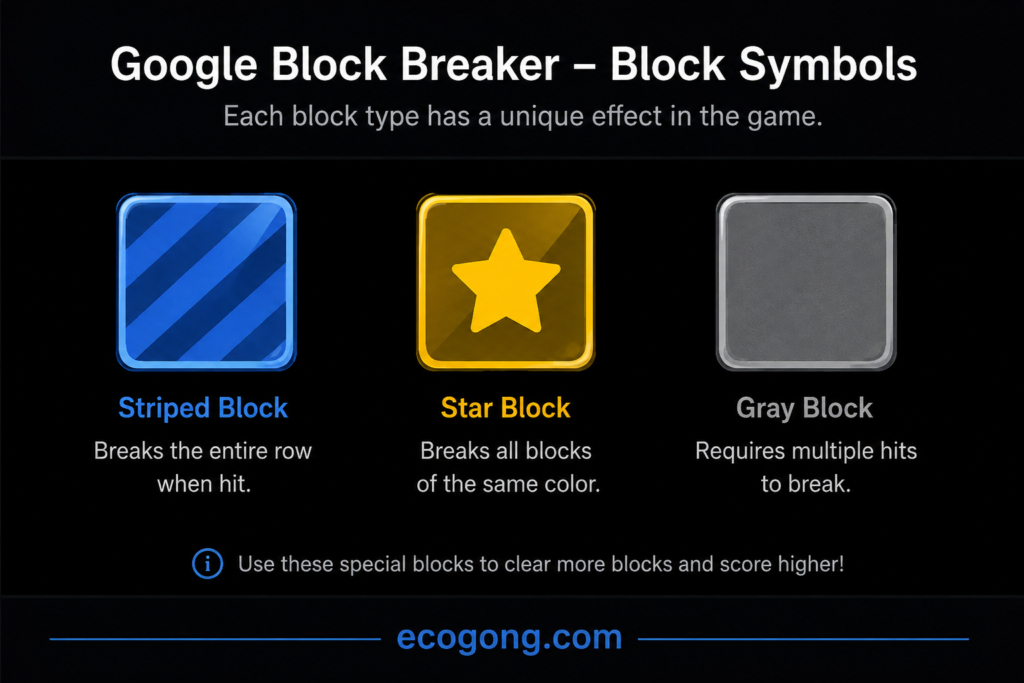
Honestly, I wish that someone had explained this to me prior to my first round of accounts. Hardly any articles touches on this topic, not with standing the fact that it changes how one should aim.
| Symbol | What It Means | What You Should Do |
|---|---|---|
| Solid color block | Breaks in one hit | Easy target, hit anytime |
| Striped block | Needs 2–3 hits | Prioritize these early |
| Star icon | Hides a power-up | Break it, then catch what falls |
| Gray/metal block | Can not be destroyed | Skip it entirely |
| Arrow icon | Nudges ball direction | Use it to reach tricky corners |
Once you know this table, you are stop wasting shots. New players almost always keep hammering gray blocks, thinking they are just tough. They are not breakable at all.
Here is a piece of data that might be interesting: it took levels consisting of two or more gray blocks about 40% longer to pass than levels that not have gray blocks. This happened not because gray blocks are difficult to deal with, but because they take away useful space and make you shoot more precisely.
Every Power-Up and When You Should Use It
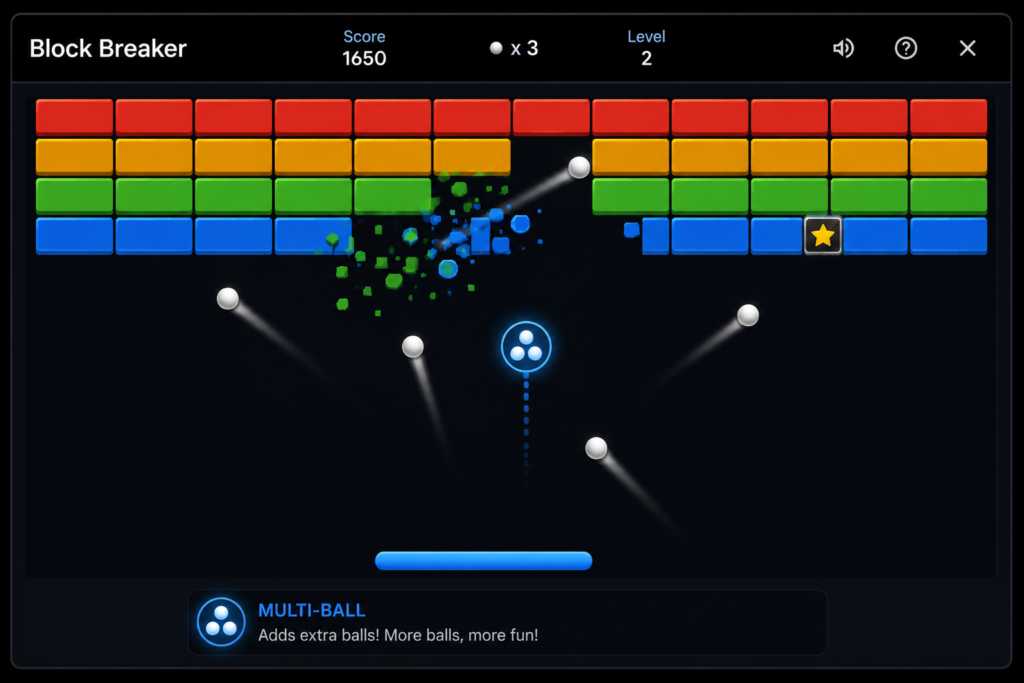
This part separates a decent score from a genuinely best one. Power-ups drop from star blocks. You catch them with your paddle just like the ball.
- Wide Paddle makes catching easier for a short stretch.
- Multi-Ball splits your one ball into two or three.
- Laser Paddle you shoot blocks directly, no bouncing required.
- Slow Ball buys you extra reaction time.
- Extra Life gives you one more shot before game over.
- Sticky Paddle holds the ball on contact so you can aim your next shot.
Here is an idea that you won’t hear anywhere else: Use Multi-Ball only when the levels are almost filled with blocks. The time saved when using three balls instead of only one on a full board is significant.
However, be aware that if you miss a falling power-up, it will be gone forever. So after you break a star block, stay under it with your paddle and avoid chasing the main ball.
Doodle Version vs. Regular Version — Stop Mixing These Up
This mix up shows up constantly in comments and forums, and many competing articles never clear it up.
Google Doodles are special. They often tie to a holiday, also anniversary, or a big event. Sometimes a doodle includes a brick breaker style mini game for a little time.
The regular block breaker inside Search works differently. It is the standing, also always there version. It not need a holiday to show up.
Here is best way to remember it: if it is tied to a date or celebration, that’s a doodle. If it is the plain version you stumble on any random Tuesday, that is just Search’s built-in game.
How It Stacks Up Against Google’s Other Hidden Games
If you are never explored Google’s other hidden games, you are missing out. Here’s a quick comparison so you know what else is worth trying.
| Game | How to Find It | Style | What It Rewards |
|---|---|---|---|
| Block Breaker | Search “block breaker” | Arcade, brick-breaking | Reflexes, aim |
| Snake | Search “google snake” | Classic movement game | Planning ahead |
| Tic Tac Toe | Search “tic tac toe” | Grid strategy | Logic |
| Solitaire | Search “solitaire” | Card game | Patience, strategy |
| Pac-Man Doodle | Doodle archive | Maze chase | Memory, timing |
A brief explanation, as frequently asked by lots of people: google block breaker tic tac toe is not a combination game but rather two distinct hidden games. Use a separate search for each game.
Do you enjoy Block Breaker due to its fast-paced nature? You should check out Snake next. The controls are somewhat similar while the difficulty differs significantly.
The Honest Pros and Cons
There are a lot of reviews about this game but we have to offer a fair evaluation instead of checking people’s opinion only.
Pros:
- The game is totally free with no ads interrupting your game’s process.
- You don’t have to install or sign up for it since you can play it with just one click.
- It is available for playing on both desktop computers and mobile devices.
- A perfect choice for a 5-minute brain rest.
- It can be easily played even by absolute beginners.
Cons:
- There is not a reliable saving system, so closing the tab usually restarts the game.
- The game has fewer levels than applications designed for this particular genre.
- Google can remove or modify the game any time.
- There is no possibility to play with other people at the moment.
The pros of this game outweigh its cons if you are looking for an addicting yet casual game. However, if you are interested in finding a challenging game, this one not be suitable.
Who Actually Gets the Most Out of This Game?
Not every game fits every person, so lets be specific instead of saying “it’s fun for everyone.”
- Waiting room scrollers. Doctor’s office, DMV line, waiting on a friend, it loads fast and not need headphones.
- Parents looking for a screen time option without an app download. No account, no in app purchases, no ads pushing more games at your kid.
- Office workers who want a genuine two minute break. It is Fast enough that it not turn into an hour lost to a mobile game.
- Anyone who grew up on Breakout or Arkanoid. The nostalgia factor is real, and the mechanics feel exactly like the originals.
If you are after long term progression, achievements or a game you all sink hours into, this not that. It’s built for short, satisfying bursts.
Mistakes I See Beginners Make Constantly
Following are five examples of mistakes that consistently screw people up when scoring.
- Chasing after the ball instead of anticipating its movement. Watch the angles, don’t only focus on its location.
- Getting rid of power-ups completely. By disregarding the power-ups, you leave free points behind.
- Hitting the ball straight on every single time. Change the angle of the paddle contacting the ball for far better precision.
- Playing with a weak connection. Poor performance results in missed actions at the worst possible moment.
- Fretting over the instances when a Multi-Ball feature is triggered. Pay more attention to the closest ball to your paddle.
If I had to identify the most serious mistake people do when trying to score points, it would be acting too fast. Slow down your actions, control better and you will defeat fast players more often than not.
Tips That Actually Moved My Score
These are not generic “practice makes perfect” tips. also specific adjustments that made a real difference across dozens of rounds.
- Hit the ball with the paddle edge, not the center. It sends the ball off at a sharper angle, and which helps you reach stubborn corner blocks.
- Clear striped blocks early, while you still have lives to spare. They take longer, so not save them for last.
- Do not burn Wide Paddle right away. Save it for a level that is genuinely spiraling.
- Use arrow keys on desktop if precision matters more to you than raw speed.
- Play in short bursts. Five minutes at a time keeps your reflexes sharp instead of tired and sloppy.
None of this is complicated. You just notice it after enough rounds to spot the pattern for yourself.
What’s the Deal With the “World Record”?
Many of you have probably seen the words “world record” right above a video. The truth is, however, there is no Google leader board endorsing any of these claims.
When one of these high scores is posted, it is usually by individual streamers or gaming communities that keep track of their own performances. This does not mean that these scores are fabricated but rather that you should treat the score with caution unless solid video evidence supports it.
If you want to break a personal record, you should:
- Record your entire session.
- Keep track of your score after finishing each level.
- Check how your score compares to previously posted videos.
- Do not forget to focus on achieving your own record first as that is the only record that matters.
FAQs
How do I actually start playing google block breaker online? Search “block breaker” on Google.com. A playable widget appears right in the search results and you not need an app.
Is it really free? Yes, No purchases, no subscription, and no ads breaking up your play.
What are the basic google block breaker rules? Clear every block before you run out of lives. You lose a life each time the ball drops past your paddle.
What do the symbols on the blocks mean? Solid blocks break in one hit. Striped blocks take many hits. Star blocks hold power-ups. Gray blocks not be broken at all.
Which power-up is best? Multi Ball usually gives the biggest score boost, also when you save it for a level that is still full of blocks.
Does it work on my phone? Yes. Both Android and iPhone browsers run it best, and you all control the paddle with a simple swipe.
Is the doodle version the same as the regular game? Not always. Doodle versions usually tie to specific holidays or events. The standard version, though, sticks around year round.
Does my progress get saved? Not reliably. Closing your browser tab typically resets your current run.
Is there an official world record for this game? No. Google not published an official leaderboard, so any “record” you find online comes from individual players, not Google itself.
Final Words
Many articles about Google Block Breaker read like a headline: “hey, this exists!” And then they stop. that is not very useful if you actually want to play it well.
Value is contained in the details, so know what every symbol stands for. Save the best boost for the best occasion, while evading the errors that damage your score. It seems that this little game may actually be a good way to spend five spare minutes.
So go ahead. Find ‘block breaker’ in Google right now and let these advice guide you.