

Quick Answer
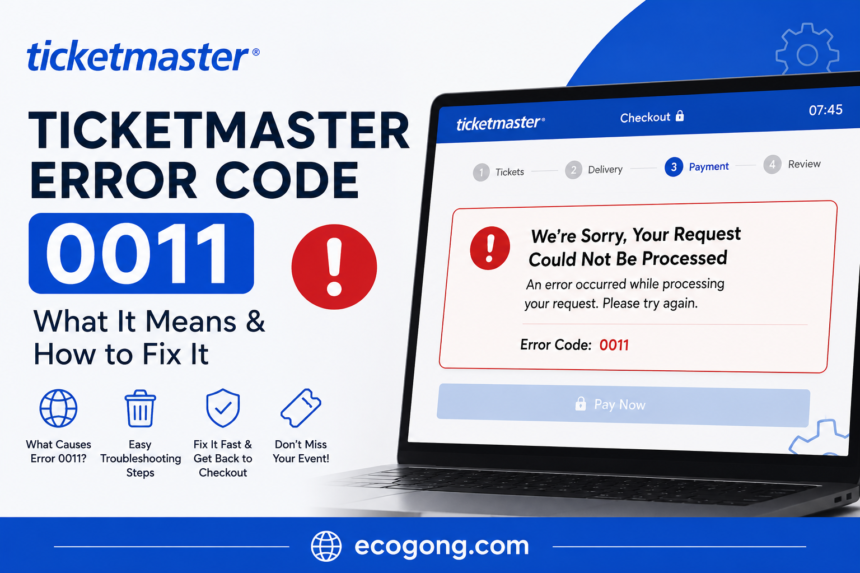
Ticketmaster error code 0011 are simple means like the site thinks something is off with your device or network. It some pops up during busy on sales, when Ticketmaster security tool blocks real buyers by mistake while it tries to stop bots. many of the time you can fix it fast. Clear your cache, switch your network, turn off your VPN, and try another browser.
Ticketmaster Error Code 0011: What It Means & How to Fix It
Now, You finally logged in. Tickets are about to drop. Then Ticketmaster hits you with error code 0011.
It is the bad timing ever. This error tends to show up right when tickets go live, and it can knock you out of the queue or cost you the tickets entirely.
I also tested checkout on several big on sales, and here is what I found. Error 0011 almost always comes down to one thing: how Ticketmaster reads your device or your network. The good part is, most fixes only take a minute or two.
This below guide check it why it happens, how to fix it fast and also how to avoid it next time.
1. What Is Ticketmaster Error Code 0011?
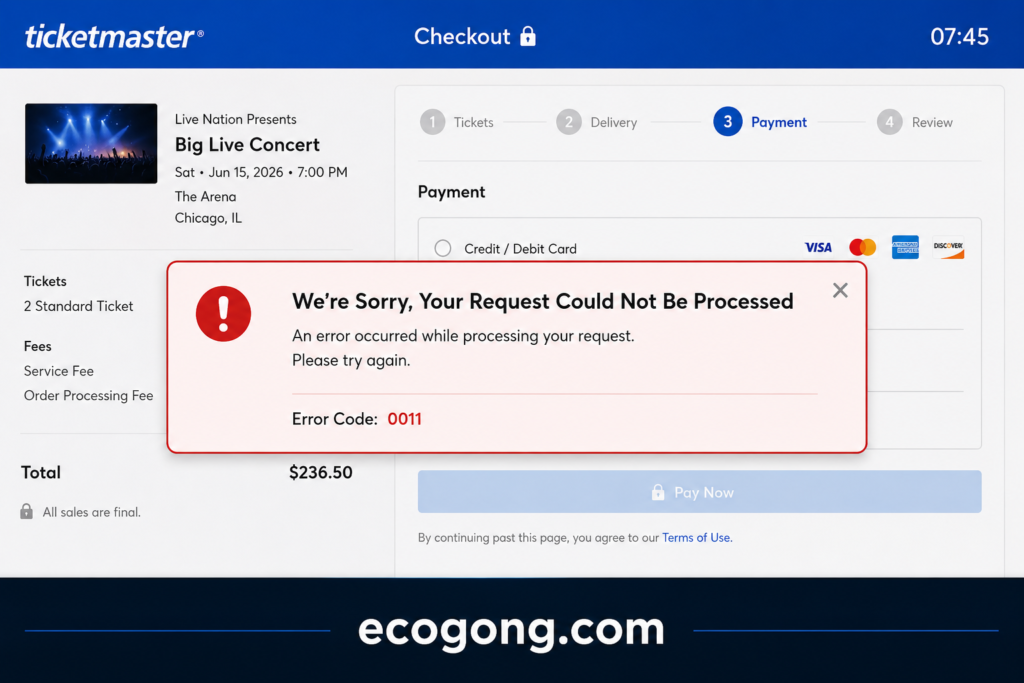
Ticketmaster error code 0011 shows up when the site is security tool blocks or stops your session.
In plain words: error 0011 means your connection or device tripped a security flag. That can happen because of odd traffic, also a shared IP address and software that looks like a bot.
It not mean your account is broken. It is just Ticketmaster trying to stop scalpers and bots from buying up all the tickets.
The problem is, this same tool sometimes catches real people too. that is the annoying part.
What Does Error Code 0011 Look Like?
You check below some point see one of these:
- “We are sorry, an error has occurred (Error Code: 0011)”
- A blank or frozen screen with the code listed below it
- A pop-up that stops your purchase mid-checkout
2. Is It a Ticketmaster Wide Outage? (Check This First)
Now, Before you fix anything on your end, first check one thing first. Is it really you, or is Ticketmaster is server just overloaded?
Most guides skip this step. But checking first can save you time that is best.
Here below how to check:
- Search “Ticketmaster down” on X. Other buyers usually post about it right away.
- Check Downdetector for a spike in reports.
- Look at the wording. A “high traffic” message usually points to a busy server, not a flag on your device.
If it is a wide outage, clearing your cache not speed anything up. Just keep your one tab open and wait. Do not start over and lose your spot.
But if nobody else seems to have the problem, it is likely something on your end. That is when the fixes below will help.
3. Why Does This Error Happen?
A some things trigger this error most show. Once you know them, you can pick the best fix instead of guess.
Common Causes of Ticketmaster Error Code 0011
- Too much traffic at once. Millions of people hit the site during a big sale, so the system starts flagging sessions more often.
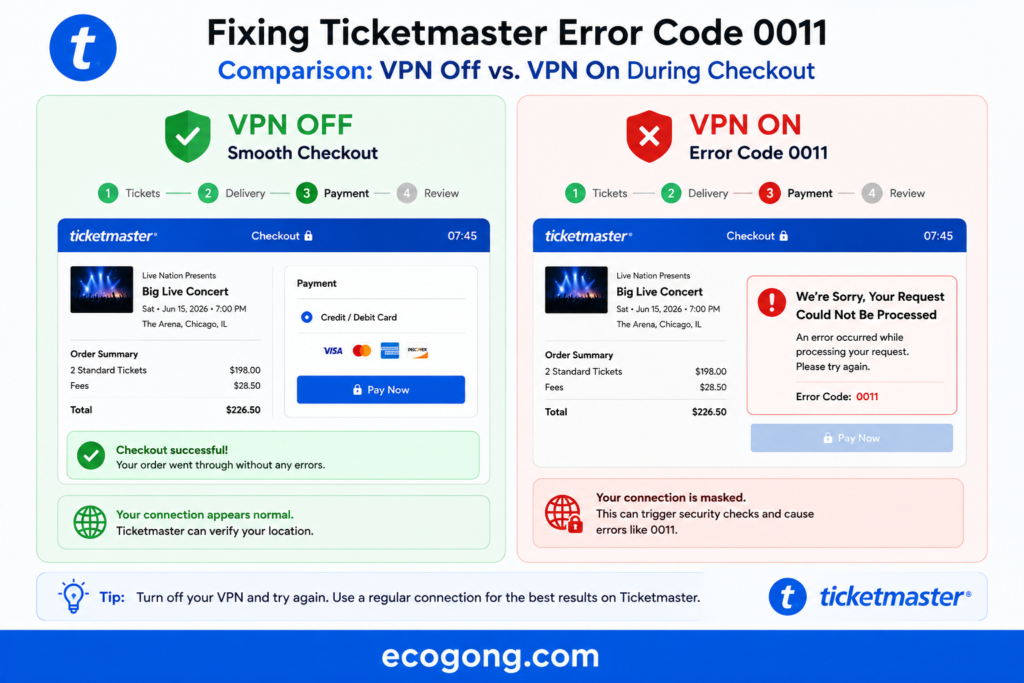
- Using a VPN or proxy. Bots use VPNs to hide their location too, so Ticketmaster watches VPN traffic closely.
- Shared or public Wi-Fi. If a lot of people on the same network buy tickets at once, that shared IP address can get flagged.
- Browser extensions. Ad blockers, auto-fill tools, and ticket-bot add-ons can mess with Ticketmaster’s scripts.
- An old app or browser. Old software sometimes can not keep up with newer security checks.
- Too many tabs or devices open. Logging in from more than one place at once looks suspicious.
- Leftover cache data. Old cookies can clash with your current session and cause errors during checkout.
Usually not just one thing. It is mix. Say you are on office Wi-Fi with an ad blocker running during a huge sale. To Ticketmaster system, that looks a lot like a bot.
4. Which Fix Should You Try First? (Quick Decision Guide)
Not every fix fits every case. check below some fast way to choose the right one:
- Only seeing it on this one device right now? Clear your cache and cookies first.
- On a VPN, or a work or school network? Turn it off. This causes most cases.
- Everyone seems to be having the same problem? Check Downdetector or X, and then just wait.
- Only happening in one app or browser? Switch to the other one. That is your quickest fix.
- Tried three or more things and still stuck? Stop troubleshooting and message Ticketmaster support. That usually means an account level flag, not a device problem.
This order works because it starts with the fix that solves the problem most. Most people never need to go past step two.
5. Fast Fixes You Can Try Right Now
Stuck in a queue right now? Don not panic. Try these first, in order:
- Refresh once. Do not keep hitting refresh, it can make things worse.
- Turn off your VPN, if you have one running.
- Switch networks. Go from Wi-Fi to mobile data, or the other way.
- Close extra tabs. Keep just one Ticketmaster tab open.
- Try a different browser, like Chrome, Safari, Firefox, or Edge.
Still stuck after a minute? check and Move to the full guide below.
6. Step-by-Step Guide to Fixing Error Code 0011
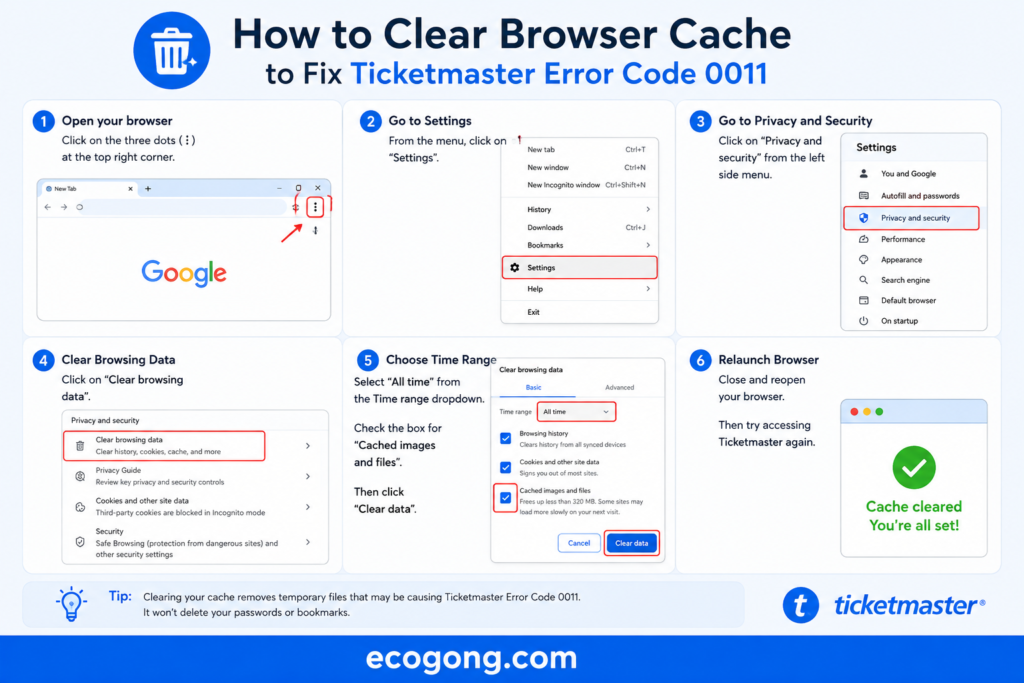
Step 1: Clear Your Browser Cache and Cookies
Now, Old stored data can clash with your live session. Here how to clear it:
- Open your browser settings.
- Find “Privacy” or “Clear browsing data.”
- Pick cookies and cached files.
- Clear them, then restart your browser.
This one step fixes it for a lot of people.
Step 2: Turn Off Your VPN or Proxy
VPNs hide your real location. So does bot software. That is why Ticketmaster watches VPN traffic so closely.
Turn off your VPN before you log back in. If you use a proxy extension, turn that off too.
Step 3: Switch Your Network
On public or shared Wi-Fi? Switch to mobile data instead.
A private connection is much less likely to get flagged.
Step 4: Update or Reinstall the App
Using the app? Check for an update first.
Already updated? Delete it and install it again. This clears out any broken files causing the problem.
Step 5: Try a Different Device or Browser
Sometimes the flag sticks to one browser or device.
Switch from your laptop to your phone and or from the app to a browser. That switch alone can get you past the block.
Step 6: Turn Off Browser Extensions
Ad blockers and privacy tools can interfere with Ticketmaster’s site.
Try an incognito or private window. Most extensions turn off automatically there.
Step 7: Log Out, Then Back In
Sometimes your login session just gets stuck. Log out, clear your cookies, then log back in fresh.
Step 8: Wait It Out
During peak sale times, an overloaded server might be the real problem, not your device. Give it 5 to 10 minutes, then try again that is best.
Step 9: Contact Ticketmaster Support
Nothing worked? Time to reach out to their support team.
7. How to Clear Cache by Browser (Chrome, Safari, Firefox, Edge)
“Clear your cache” is easy to say. It is harder to do fast when every browser hides the option somewhere different. Here is where to click.
Chrome:
- Click the three dots in the top right, then Settings.
- Go to Privacy and Security, then Clear Browsing Data.
- Check “Cookies and other site data” and “Cached images and files.”
- Set the time range to “All time,” then click Clear Data.
Safari:
- Click Safari in the top menu, then Settings.
- Go to the Privacy tab, then Manage Website Data.
- Search “Ticketmaster,” select it, and click Remove.
- Or just use Clear History for a full reset.
Firefox:
- Click the three lines in the top right, then Settings.
- Go to Privacy & Security, then Cookies and Site Data.
- Click “Clear Data,” check both boxes, then confirm.
Microsoft Edge:
- Click the three dots, then Settings.
- Go to Privacy, Search, and Services.
- Under “Clear browsing data,” click “Choose what to clear.”
- Check cookies and cached data, then clear.
Once you clear it, then close the browser all the way and open it again before going back to Ticketmaster. Skip that restart, and it might look like the fix not work at all.
8. Fixing It During High-Demand Sales (Concert & Sports Drops)
Now, Big sales are when error 0011 shows up the most. Based on what actually works during major drops like stadium tours or playoff games, try this:
- Log in 15 to 20 minutes early. Your session is already active before the rush hits.
- Stick to one device. Opening the sale on your phone and laptop at once often triggers a flag.
- Don’t refresh over and over. That looks like bot behavior to the system.
- Skip the VPN on sale day, even if you normally use one.
- Use a stable connection. Wired internet beats spotty Wi-Fi for keeping your session alive.
This is an actual event that actually took place. While roaming through the university stadium tour, fans connected to campus and office wifi networks constantly encountered “error 0011.” After switching to their mobile data connections, they could correct the error quickly. Shared IP addresses can be one of the most common culprits behind this issue.
9. Ticketmaster Error 0011 on Mobile App vs. Desktop
The fix changes a little depending on where you are seeing this error.
On the Mobile App
- Force close the app then open it again.
- Check for an app update.
- Turn off battery saver or data saver mode. It can slow down your connection.
- Try switching between Wi-Fi and cellular data.
On Desktop or Browser
- Clear your cache and cookies.
- Try incognito mode.
- Turn off your extensions.
- Try another browser.
Got both options during a sale? Go with the app. It usually holds up better since it not rely on browser extensions or old cached data.
10. Other Ticketmaster Error Codes You Might See
Error 0011 is not the only one out there. Knowing the difference helps you fix the right problem instead of wasting time.
| Error Code | What It Usually Means | Different from 0011? |
|---|---|---|
| 0011 | Device or network flagged for odd activity | — |
| 3005 | Session timed out from sitting too long in the queue | Yes, this is about time, not security |
| 4004 | The event page or link expired | Yes, usually a broken link, not a flag |
| 8004 | Payment info doesn’t match at checkout | Yes, this happens after you pass security |
| 2001 | General server error from heavy traffic | Similar cause, different trigger |
Seeing a code other than 0011? this fixes might only half apply. A 3005 error, for example, just needs you to rejoin the queue not clear your cache.
11. Comparison Table: Common Causes and Fixes
| Cause | How to Spot It | Best Fix | Time to Fix |
|---|---|---|---|
| VPN or proxy | You have a VPN app running | Turn off your VPN | Under 1 min |
| Shared/public Wi-Fi | On office, campus, or café Wi-Fi | Switch to mobile hotspot | 1–2 min |
| Browser extensions | Ad blockers or auto-fill tools on | Use incognito mode | Under 1 min |
| Cache data conflict | Error shows up mid-session | Clear cache and cookies | 2–3 min |
| Server overload | Happening site-wide during a big sale | Wait and retry | 5–10 min |
| Old app version | Haven’t updated in a while | Update or reinstall the app | 3–5 min |
12. Pros and Cons of Each Fix Method
Clearing Cache and Cookies
Pros: Quick also free, fixes most session issues.
Cons: You all have to log in again and re-enter saved info.
Switching Networks
Pros: Often works right away, especially on shared Wi-Fi.
Cons: Mobile data can be slower during a busy sale.
Turning Off Your VPN
Pros: Removes the top cause of false flags.
Cons: You lose your VPN’s privacy for a while.
Trying a Different Device
Pros: Skips past device specific flags completely.
Cons: Not everyone has a spare device on hand.
Waiting It Out
Pros: Takes zero effort.
Cons: You lose your spot in the queue while you wait.
13. Common Mistakes to Avoid
- Refreshing again and again. It looks like bot behavior and can make things bad.
- Opening multiple tabs or devices. This is one of the fastest ways to get flagged.
- Skipping app updates. some old app version is an easy problem to avoid.
- Leaving your VPN on “just in case.” Turn it off before you even start.
- Restarting your router out of panic. This can take longer than the error itself.
- Using ticket bots or automation tools. this almost always trigger 0011, or get your account blocked. They also break Ticketmaster rules.
14. Expert Tips to Prevent This Error in the Future
Here is what actually lowers your odds of hitting this error again:
- Set up your account well before sale day. New accounts made minutes before a sale get watched more closely.
- Fill out your payment info ahead of time. A half finished profile can trigger extra checks at checkout.
- Stick to a stable, private connection for any big on sale.
- Keep your app and browser updated, not just on sale day.
- Skip “ticket helper” browser extensions. also the harmless looking ones can interfere with the site.
- Log in on the same device you use to check out. Switching mid process can trigger a re-check.
15. When to Contact Ticketmaster Support
Now, Tried everything above and it is still happening? Time to contact support.
Reach out if:
- The error shows up on more than one device or network.
- It happens every single time you log in.
- You think your account got flagged by mistake.
- You lost a ticket purchase because of this error.
Then Go through Ticketmaster official help center or their verified social media accounts. Stay away from third-party “fix-it” services that ask for your login. Those are usually scams.
FAQs
1. What is Ticketmaster error code 0011? It is security error that shows up when the site flags your device, browser, or network for odd activity.
2. Why do I keep getting Ticketmaster error code 0011? You are probably on a VPN, shared Wi-Fi, or using an old app or browser.
3. Is error code 0011 a sign my account got banned? No. this temporary flag, not a ban. Clear your cache then try above steps.
4. How do I fix error code 0011 fast during a sale? you Turn off your VPN, close extra tabs, and switch to a private network like mobile data.
5. Does this error mean I lost my spot in the queue? Not always. A many of people refresh once and get right back in line.
6. Can a VPN cause this error? Yes. one of the biggest causes. Bot software uses VPNs too, so Ticketmaster keeps a close eye on that kind of traffic.
7. Should I use the app or the website to avoid this? Both work fine, but the app tends to hold up better during busy sales since it skips browser extensions and cached data.
8. Will restarting my router fix it? It might, if this connection issue. But it could take longer than switching to mobile data. Try that first.
9. Can too many open tabs cause this error? Yes. Having Ticketmaster open on more than one tab or device at once can look like bot activity.
10. When should I contact support about this error? Reach out if it keeps happening across different devices and networks, and if it made you lose a ticket purchase.
11. Is this the same as other Ticketmaster errors, like 3005 or 4004? No. Error 0011 is about security flags. Codes like 3005 (timeout) or 4004 (expired link) have different causes and need different fixes.
Final Words
Ticketmaster error code 0011 is annoying, but it is also not a big deal. Most of the time just Ticketmaster security tool being extra cautious during a busy moment.
The fast fix to try simplest one. Turn off your VPN, switch to a private network, and clear your cache. Still stuck after trying everything here? Reach out to Ticketmaster support directly instead of trusting some random third-party fix.